

logo logo

Stay ahead in the fast-paced world of artificial intelligence. Subscribe to our newsletter and follow us on social media for daily updates, deep dives, and expert analysis — only at Best AI Blog.

10 Genuinely Free AI Tools Worth Using in 2026 (No Credit Card Needed)

“Free” in AI usually means a crippled trial. This list is different: 10 tools whose free tiers are genuinely usable for real work in 2026 — no credit card, generous limits — with exactly what the free tier includes and where the paywall actually starts.

Assistants

1. ChatGPT (free tier)

Free tier includes the current mainline model with generous daily limits, web search, and file uploads. Paywall starts: heavy daily usage, top reasoning model, longer memory. chatgpt.com

2. Claude (free tier)

Free access to a strong Sonnet-class model — arguably the best free writing and coding quality anywhere. Paywall: daily message caps, Opus/Fable-class models, Projects at scale. claude.ai

3. Gemini (free tier)

Free Gemini includes huge context, strong multimodal (images, PDFs, video) and deep Google Workspace hooks. Paywall: Pro-tier models and higher limits via Google One AI. gemini.google.com

Research & Writing

4. Perplexity (free tier)

AI search with citations — the free tier handles unlimited quick searches plus a daily allowance of deep “Pro” searches. Best free research entry point. perplexity.ai

5. NotebookLM

Google’s research notebook: upload your PDFs/docs and chat with them, generate summaries and even audio overviews — free with a Google account. Killer for students. notebooklm.google.com

6. Hugging Face Spaces

Thousands of free hosted AI demos — image models, audio tools, OCR, translators — run in the browser, no setup. The eternal playground. huggingface.co/spaces

For Builders

7. Ollama

Not a free tier — actually free, forever: run open-weight LLMs locally with zero API costs and total privacy. Full walkthrough in our Ollama 2026 guide. ollama.com

8. Google AI Studio

Free API access to Gemini models with a real free quota — the cheapest way to prototype an AI app in 2026. Paywall: production-scale rate limits. aistudio.google.com

9. Groq

Free playground + free API tier serving open models (Llama, Qwen) at absurd speed — hundreds of tokens/second. Great for latency-sensitive prototypes. groq.com

10. GitHub Copilot (free tier)

The free tier gives a monthly allowance of code completions and chats right inside VS Code — enough for hobby projects. Paywall: serious daily coding. github.com/features/copilot

Comparison Table

ToolBest free useCard needed?
ChatGPTgeneral assistantNo
Claudewriting & coding qualityNo
Geminimultimodal + Google appsNo
Perplexitycited researchNo
NotebookLMchat with your documentsNo
HF Spacestrying any AI modelNo
Ollamafully local, unlimitedNo — no account at all
Google AI Studiofree API for prototypesNo
Groqfastest free inferenceNo
Copilot Freehobby codingNo

💡 The Zero-Rupee Stack

Claude (writing) + Perplexity (research) + NotebookLM (documents) + Ollama (private/local) + Google AI Studio (building) = a complete AI workflow for exactly ₹0/month.

Free-tier details are as of July 2026 and change often — check each site’s pricing page. No affiliate links; nobody paid to be here.

Prompt Engineering in 2026: 12 Techniques That Actually Work (With Examples)

Models got smarter in 2026 — but the gap between a lazy prompt and a well-engineered one is still the difference between garbage and gold. These are 12 techniques that measurably improve results with ChatGPT, Claude, and Gemini today, each with a copy-paste example.

The Big Four (Do These First)

1. Give it a role and a reader

"You are a senior tax consultant. Explain GST registration to a first-time freelancer." — role shapes vocabulary and depth; the reader shapes tone. Two words of context beat two paragraphs of correction later.

2. Show, don’t describe (few-shot)

One or two examples of your desired output outperform any description of it. Paste a sample, then say “match this format and tone exactly.”

3. Constrain the output

"Reply in exactly 5 bullet points, each under 15 words, no intro or outro." Models over-explain by default; constraints are how you stop it.

4. Give it an out

Add "If you're not sure, say 'I don't know' rather than guessing." This one line cuts hallucinations dramatically — models bluff when they think an answer is mandatory.

Structure Techniques

5. Use delimiters for data

Wrap pasted content in tags: <document>...</document>, then instruct about “the document”. The model stops confusing your instructions with your data.

6. Ask for structured output

Need data? Demand JSON with a schema: "Return only valid JSON: {"title": str, "score": 1-10, "reasons": [str]}". All major APIs now enforce schemas natively too.

7. Break big jobs into steps

Don’t ask for “a business plan”. Ask for the outline, approve it, then ask for each section. Chained small prompts beat one giant prompt on both quality and control.

8. Prime the plan before the answer

"First list your approach in 3 bullets. Wait for my OK, then execute." You catch wrong directions before they become wrong essays.

Advanced Techniques

9. Self-critique pass

After any draft: "Now act as a harsh editor. List 5 specific weaknesses in your answer, then rewrite it fixing them." Two prompts, dramatically better output.

10. Negative examples

Telling the model what NOT to do is underrated: "Avoid: buzzwords, passive voice, sentences over 20 words, the phrase 'in today's fast-paced world'."

11. Context dumping with a question last

Long context? Put ALL background first and your actual question at the very end. Models weight the end of the prompt heavily — burying the question mid-prompt loses it.

12. Prompt reuse via templates

Save your winners. A personal library of 10 tested templates (email draft, code review, summary, critique…) compounds — teams that template prompts ship 2-3x faster than teams that improvise every time.

What Stopped Working in 2026

⚠️ Retire These

  • “Think step by step” — reasoning models do this internally now; the magic phrase adds little.
  • Threatening/tipping the model (“I’ll pay you $200”) — never really worked, definitely doesn’t now.
  • Mega-prompts — 2,000-word system prompts confuse more than they control. Tight beats long.

Want the full model-picking context? See our LLM Landscape July 2026 guide.

Further reading: Anthropic prompt engineering docs · OpenAI prompting guide · Google prompting strategies.

Stanford’s TRACE Explained: Turning AI Agent Failures Into Training Environments

AI agents have an embarrassing habit: they fail the same way, over and over. A Stanford research team traced this to something specific — missing, reusable capabilities — and built a system that finds those gaps and trains for them directly. It’s called TRACE (Turning Recurrent Agent failures into Capability-targeted training Environments), and it’s open-source under an MIT license.

The Problem TRACE Solves

When an agent fails a task, the two standard fixes both waste compute:

  • Direct RL or SFT gives sparse rewards that never tell you which skill was missing — the model gets a zero and no explanation.
  • Broad synthetic data is untargeted, so training budget flows to skills the model already has.

💡 The Core Insight

Agent failures are not random. A small set of capability deficits accounts for most failed trajectories — so each recurring deficit can become its own dense, verifiable training signal.

The 4-Step Pipeline

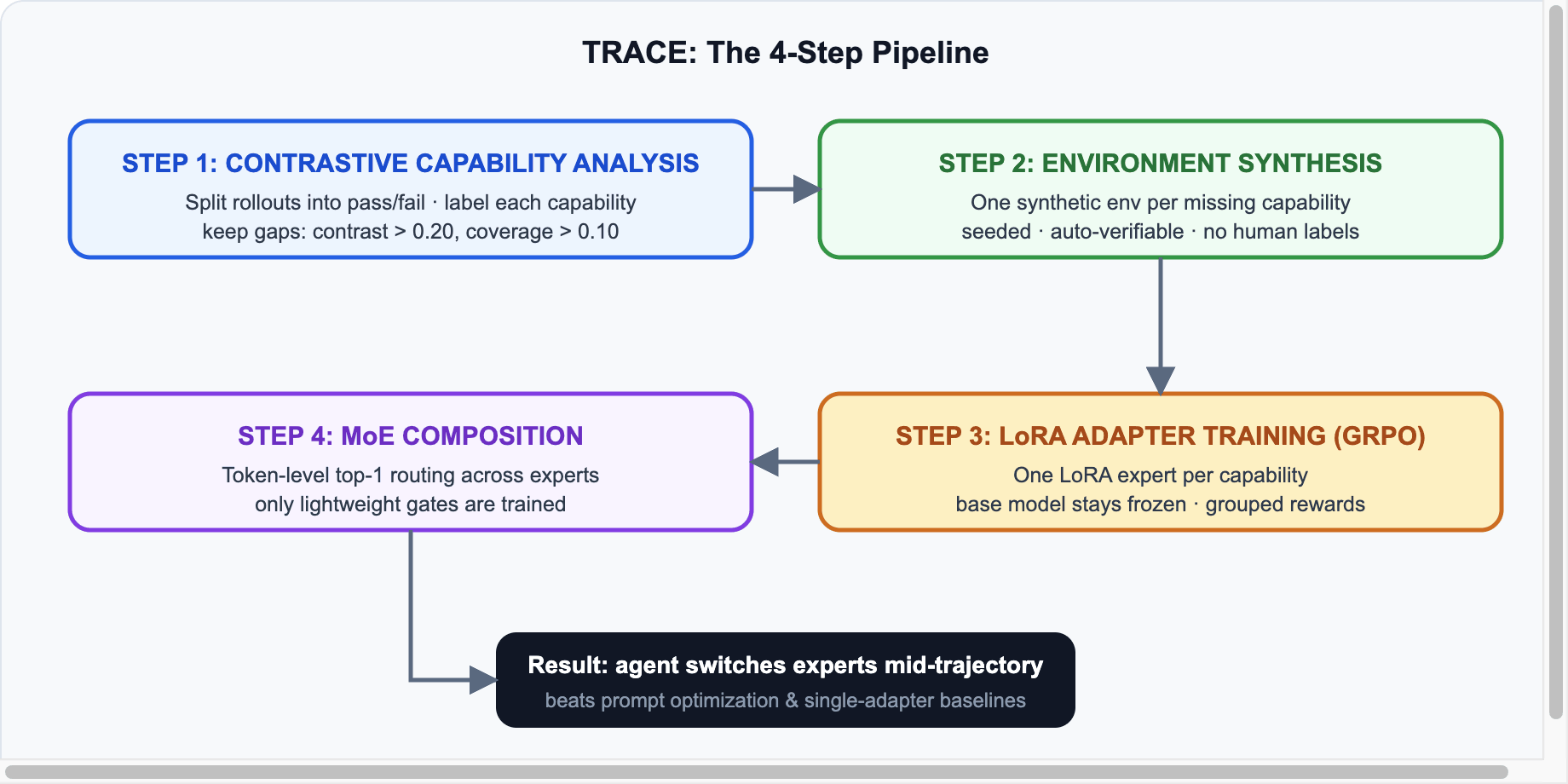
TRACE 4-step pipeline diagram
TRACE turns recurring failures into targeted, verifiable training environments

Each Step Explained

Step 1: Contrastive capability analysis

The base agent generates rollouts in the target environment. An analysis agent (an LLM following a markdown prompt) splits them into successful and failed sets, then labels every trajectory-capability pair as NA, PRESENT, or LACKING. A capability is kept only if it’s genuinely contrastive — its gap between failures and successes must clear δ = 0.20, and it must appear in at least ρ = 0.10 of trajectories. That filters out noise and keeps skills whose absence concentrates in failures.

Step 2: Targeted environment synthesis

A generation agent builds one synthetic environment per retained capability, isolating that single skill while preserving the original environment’s tool schemas and formats. Task instances are procedurally generated from random seeds, and because generation and verification are algorithmic, rewards need no human labels and no LLM judge.

Step 3: Capability adapter training

Each capability gets its own LoRA adapter, trained on its synthetic environment with GRPO (Group Relative Policy Optimization) — the same algorithm family DeepSeek popularized. Rollouts are grouped by shared seed so scenarios are identical within a group, and rewards are normalized within each group. The base model stays completely frozen.

Step 4: MoE composition with token-level routing

Finally, the adapters are composed into a Mixture-of-Experts model. Backbone and adapters stay frozen; only lightweight token-level gates are trained. At inference, each token routes top-1 to a single capability adapter — meaning the agent can switch experts mid-trajectory as the task shifts from, say, record retrieval to precondition verification.

Results and Why They Matter

On τ²-Bench with Qwen3-30B-A3B, targeted training plus MoE composition beat both prompt optimization and single-adapter baselines. The bigger story is the method: failure analysis → targeted synthetic environments → composable experts is a loop that any team can run continuously as their agent hits new walls.

What Builders Should Take Away

  • Stop retraining everything. Diagnose which specific capability is failing before spending on RL.
  • Synthetic doesn’t mean sloppy. Seeded, procedurally-verified environments give dense rewards without labeling costs.
  • LoRA + routing is cheap modularity. Frozen base + per-skill adapters means you can add capabilities without catastrophic forgetting.

Sources & further reading: MarkTechPost coverage · LoRA paper · TRACE is released open-source under MIT license.

CrewAI Tutorial (2026): Build a Multi-Agent AI Team With Working Code

CrewAI is the easiest way to build a team of AI agents that work together — a researcher that searches, a writer that drafts, an editor that polishes. It’s a lean Python framework (independent of LangChain) and in 2026 it’s one of the most popular multi-agent frameworks in production, with its 1.x line stable since late 2025. This tutorial builds a working three-agent content crew from scratch.

Core Concepts

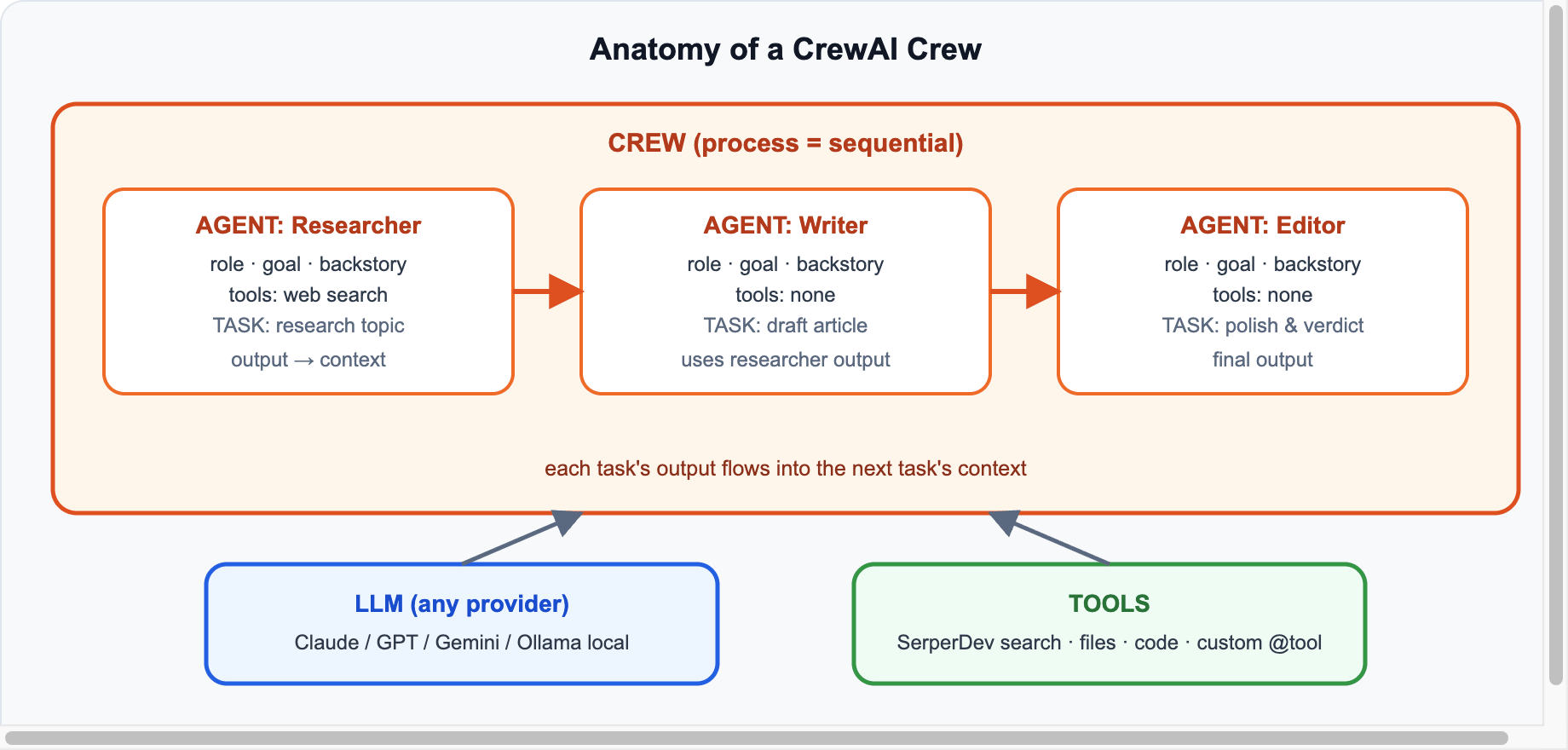
CrewAI crew anatomy: agents, tasks, process, LLM, tools
A crew = agents + tasks + a process; each task’s output feeds the next

Four building blocks: an Agent has a role, goal and backstory (this shapes its behavior more than you’d think); a Task is a unit of work assigned to an agent; Tools give agents abilities (search, files, code); and the Crew wires it together with a process — sequential (pipeline) or hierarchical (a manager agent delegates).

Install & Setup

pip install crewai crewai-tools
export ANTHROPIC_API_KEY="sk-ant-..."
export SERPER_API_KEY="..."   # free tier at serper.dev for web search

Define Your Agents

from crewai import Agent, Task, Crew, Process, LLM
from crewai_tools import SerperDevTool

llm = LLM(model="anthropic/claude-sonnet-5", temperature=0.3)
search = SerperDevTool()

researcher = Agent(
    role="AI News Researcher",
    goal="Find accurate, current facts about {topic}",
    backstory="A meticulous tech journalist who always verifies claims from multiple sources.",
    tools=[search], llm=llm, verbose=True,
)

writer = Agent(
    role="Tech Blog Writer",
    goal="Write a clear, engaging 600-word article about {topic}",
    backstory="A developer-turned-writer who explains complex topics simply without dumbing them down.",
    llm=llm,
)

editor = Agent(
    role="Editor",
    goal="Polish the draft: fix flow, cut fluff, verify claims match research",
    backstory="A ruthless editor who deletes every sentence that doesn't earn its place.",
    llm=llm,
)

Define Tasks

research_task = Task(
    description="Research {topic}. Collect 5-7 key facts with dates and numbers.",
    expected_output="A bullet list of verified facts with source URLs.",
    agent=researcher,
)

write_task = Task(
    description="Using the research, write a 600-word blog article about {topic}.",
    expected_output="A structured article with headline, intro, 3 sections, conclusion.",
    agent=writer, context=[research_task],
)

edit_task = Task(
    description="Edit the draft for clarity and accuracy against the research.",
    expected_output="The final publication-ready article.",
    agent=editor, context=[research_task, write_task],
)

Assemble and Run

crew = Crew(
    agents=[researcher, writer, editor],
    tasks=[research_task, write_task, edit_task],
    process=Process.sequential,
)

result = crew.kickoff(inputs={"topic": "open-weight LLMs in 2026"})
print(result.raw)

That’s a complete multi-agent pipeline: the researcher searches the web, the writer drafts from the research, the editor polishes with both as context.

Crews vs Flows

CrewAI also ships Flows — event-driven, precise orchestration where you control each step programmatically (with state, branching, and human checkpoints). Rule of thumb: use a Crew when you want autonomous collaboration; use a Flow when the sequence must be deterministic (billing pipelines, approval chains), and embed crews inside flows for the creative middle parts.

Production Tips

⚠️ Learn From Everyone’s Mistakes

  • Backstories matter — they’re not decoration; specific personas measurably change output quality.
  • Set max_iter and timeouts — agent loops can spiral; bound them.
  • expected_output is your contract — vague expectations produce vague results.
  • Watch token costs — three agents with search can burn 50k+ tokens per run; use a value-tier model (Sonnet/Haiku) unless quality demands more.

Sources & further reading: CrewAI docs · GitHub · Serper (search API). Tested on the CrewAI 1.x line (current: 1.14).

Run LLMs Locally With Ollama: The Complete 2026 Guide

Want ChatGPT-class AI that runs on your machine — free, private, offline? That’s Ollama. One install, one command, and you’re chatting with an open-weight LLM locally. This is the complete 2026 guide: setup, choosing models, the API, connecting frameworks, and squeezing performance out of your hardware.

How Ollama Works

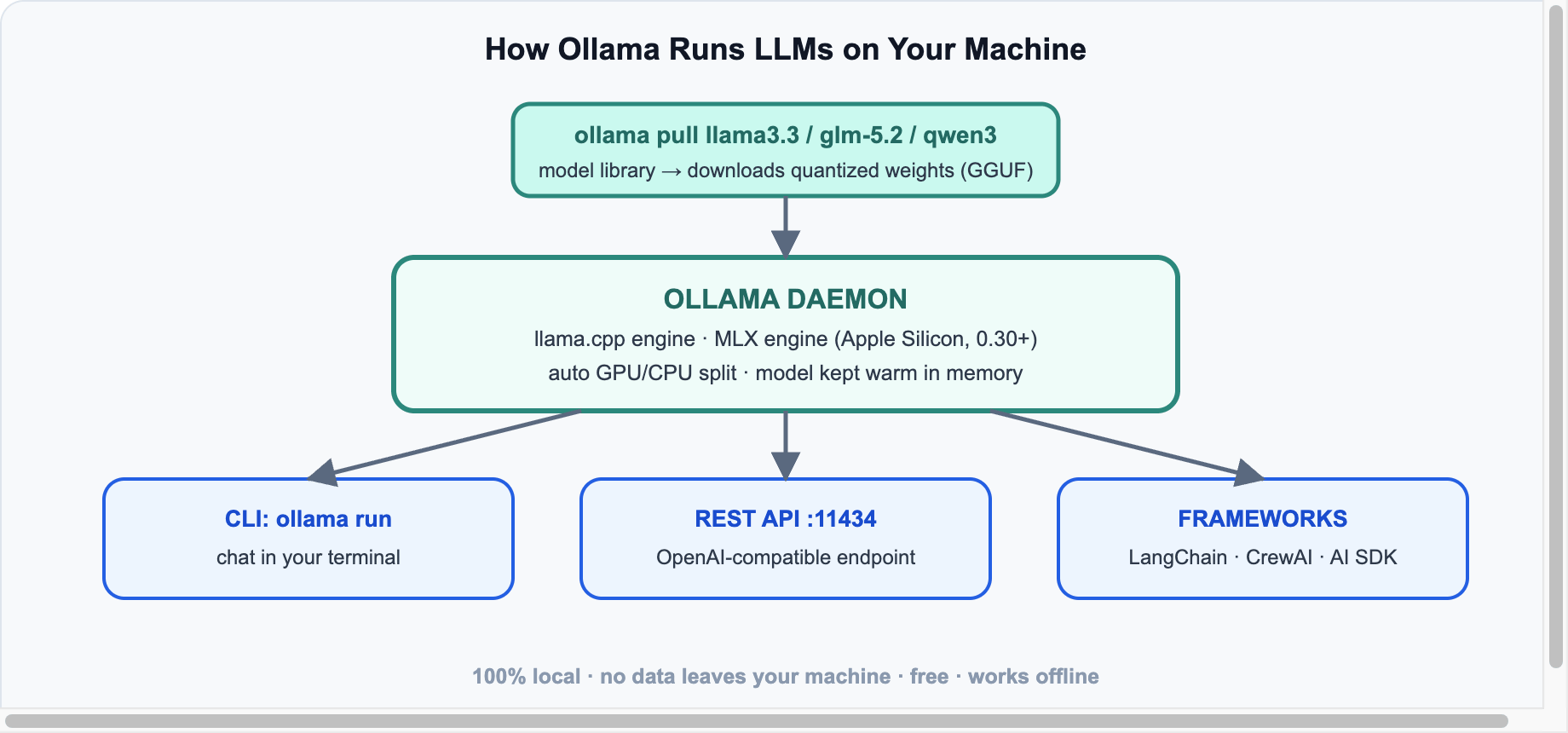
Ollama local stack diagram
One daemon, every interface: CLI, REST API, and framework integrations

Ollama is a local daemon that downloads quantized open-weight models and serves them through a REST API on port 11434. Under the hood it runs llama.cpp — and since v0.30, a dedicated MLX engine on Apple Silicon that makes Macs dramatically faster. Nothing you type ever leaves your machine.

Install & First Chat

# macOS / Linux
curl -fsSL https://ollama.com/install.sh | sh   # or download the app from ollama.com

ollama run llama3.3        # downloads the model on first run, then chats

That’s genuinely it. /bye exits the chat; ollama list shows what you’ve downloaded; ollama ps shows what’s loaded in memory. Recent versions also added ollama launch to spin up coding agents (Codex, OpenCode) wired to local models in one command.

Which Model to Pull (July 2026)

RAM you havePull thisGood for
8 GBllama3.2:3b, qwen3:4bchat, summaries, quick Q&A
16 GBllama3.3 (8B), qwen3:8bsolid general use, light coding
32 GBqwen3:32b, glm-5.2:airserious coding, agents
64 GB+deepseek-v4:70b-class, MiniMax M2.5 quantsnear-frontier quality, fully local

Rule of thumb: a Q4-quantized model needs roughly RAM = parameters × 0.6 (an 8B model ≈ 5 GB). Browse the full library at ollama.com/library.

The API

Ollama exposes its own API and an OpenAI-compatible endpoint — so any tool that speaks OpenAI works locally by changing one URL:

curl http://localhost:11434/v1/chat/completions -d '{
  "model": "llama3.3",
  "messages": [{"role": "user", "content": "Explain quantization in one line."}]
}'
# Python, using the standard openai package
from openai import OpenAI
client = OpenAI(base_url="http://localhost:11434/v1", api_key="ollama")
r = client.chat.completions.create(model="llama3.3",
    messages=[{"role":"user","content":"Hello local AI!"}])
print(r.choices[0].message.content)

Connecting Frameworks

  • LangChain: init_chat_model("ollama:llama3.3") — everything from our LangChain A-to-Z tutorial works locally.
  • CrewAI: LLM(model="ollama/llama3.3", base_url="http://localhost:11434").
  • AI SDK (React): the community ollama-ai-provider plugs into the same streamText pattern from our React 19 + AI guide.

Performance Tips

⚡ Speed Checklist

  • Apple Silicon? Update to 0.30+ for the MLX engine — big token/sec gains on M-series.
  • Keep models warm: OLLAMA_KEEP_ALIVE=1h avoids reload lag between requests.
  • Context costs RAM: long contexts eat memory fast; set num_ctx to what you actually need.
  • Don’t over-quantize: Q4_K_M is the sweet spot; below Q3 quality falls off a cliff.
  • GPU offload is automatic — but ollama ps tells you how much of the model actually fit on the GPU.

Sources & further reading: ollama.com · GitHub (150k+ stars) · Ollama blog (MLX engine, ollama launch). Current release line: 0.30/0.31.

Fine-Tuning vs RAG vs Prompt Engineering: How to Choose in 2026

“Should we fine-tune a model?” is the most expensive question in applied AI — because the honest answer is usually no, not yet. There are three ways to make an LLM better at your task: prompting, RAG, and fine-tuning. They solve different problems, cost wildly different amounts, and teams routinely pick the wrong one. Here’s the decision framework we’d actually use in 2026.

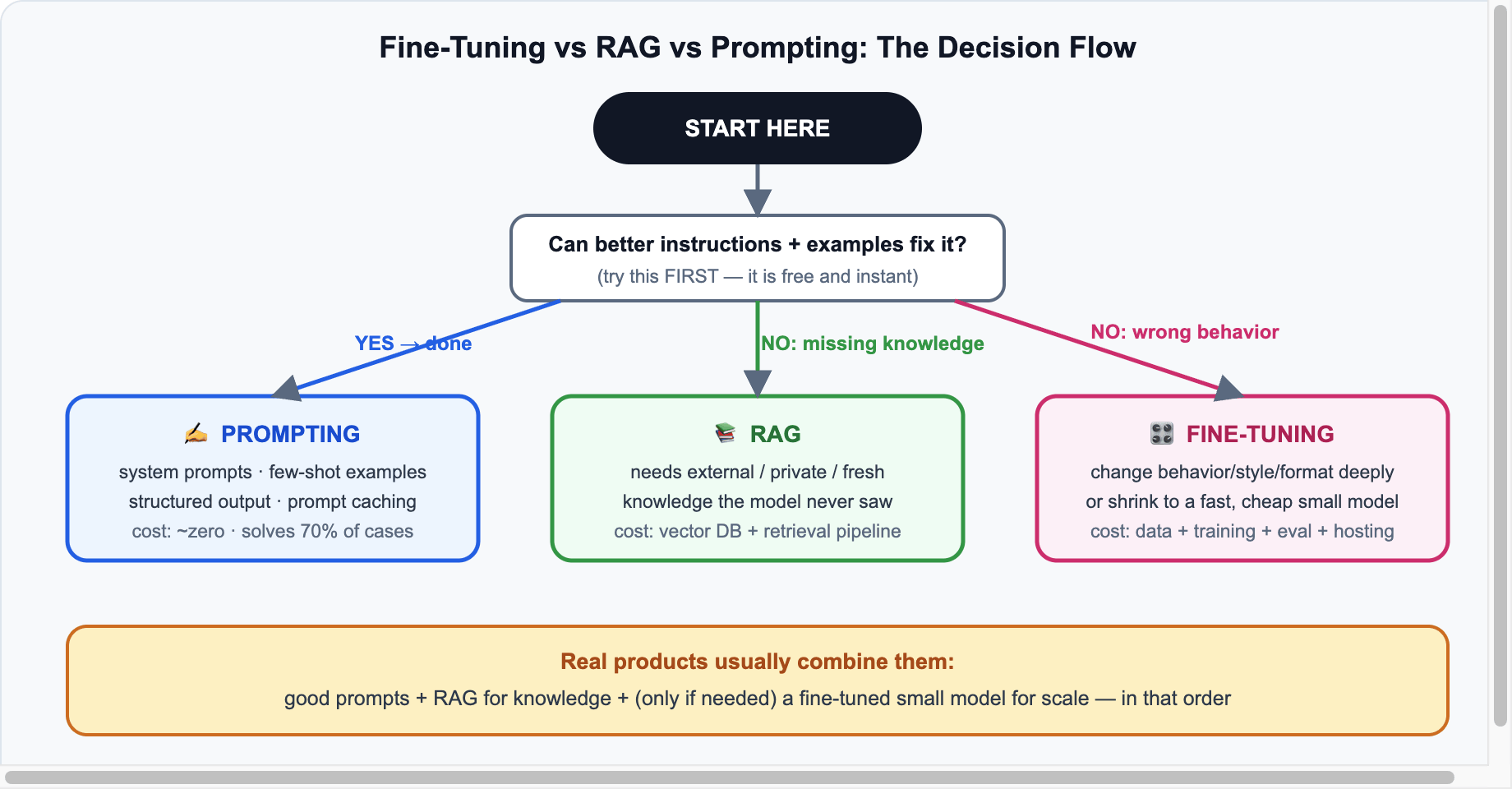
The Decision Flow

Fine-tuning vs RAG vs prompting decision flowchart
One question at a time: instructions first, knowledge second, behavior last

Level 1: Prompting — Free, Instant, Underrated

Better instructions, few-shot examples, structured output schemas, and prompt caching solve roughly 70% of “the model isn’t good enough” complaints. Modern frontier models follow instructions so well that most 2023-era fine-tuning use cases (tone, format, persona) are now just a good system prompt.

Reach for it when: output format is wrong, tone is off, the model ignores rules, or accuracy improves with 2–3 examples.
Limits: it can’t teach the model facts it never saw, and giant prompts cost tokens on every call (though caching cuts that dramatically).

Level 2: RAG — When the Model Lacks Knowledge

Retrieval-Augmented Generation fetches relevant chunks from your data (docs, tickets, DB rows) and injects them into the prompt at query time. It’s the right answer whenever the problem is missing or fresh knowledge: internal wikis, product catalogs, anything updated daily.

Why it beats fine-tuning for knowledge: update the index, not the model; sources are citable; no training run, no forgetting, and it works with any model — including local ones via Ollama. The modern pattern is RAG-as-a-tool: the agent decides when to retrieve (we show this in the LangChain tutorial).
Limits: retrieval quality is your ceiling — bad chunking or embeddings mean bad answers; and it adds latency plus vector-DB infrastructure.

Level 3: Fine-Tuning — When Behavior Must Change

Fine-tuning (in practice: LoRA adapters on an open-weight model, or a provider’s tuning API) changes the model’s behavior — not its knowledge base. Two situations genuinely justify it in 2026:

  • Deep behavior/format change: a strict domain style, a proprietary DSL, tool-calling patterns the base model keeps fumbling — and prompting demonstrably failed.
  • Scale economics: distilling a task onto a small open model (3–8B) so it runs faster and ~10x cheaper than calling a frontier API a million times a day.

Real costs people forget: curating 500–10,000 quality examples (the actual bottleneck), eval design, retraining on every base-model upgrade, and hosting. Research systems like Stanford’s TRACE (our breakdown) point the way: diagnose the missing capability first, then train narrowly on it.

Side-by-Side

PromptingRAGFine-tuning
Fixesinstructions, format, tonemissing/fresh knowledgebehavior, style, scale cost
Setup cost~zerodays (pipeline + vector DB)weeks (data + training + evals)
Update speedinstantre-index (minutes)retrain (days)
Citable sources✅ yes❌ no
Works with any model❌ model-specific
Biggest riskprompt bloatbad retrievalwasted budget, forgetting

How Real Products Combine All Three

A typical 2026 production support bot: a tight system prompt (persona, rules, output schema) + RAG over the help center (fresh, citable answers) + optionally a fine-tuned small model for triage/routing where volume makes frontier APIs uneconomical. In that order — each layer added only after the previous one measurably fell short.

✅ The One-Line Rule

Wrong instructions → prompt. Missing knowledge → RAG. Wrong behavior at scale → fine-tune. And always in that order.

Further reading: OpenAI: optimizing LLM accuracy · Anthropic prompt engineering guide · original RAG paper · LoRA paper.

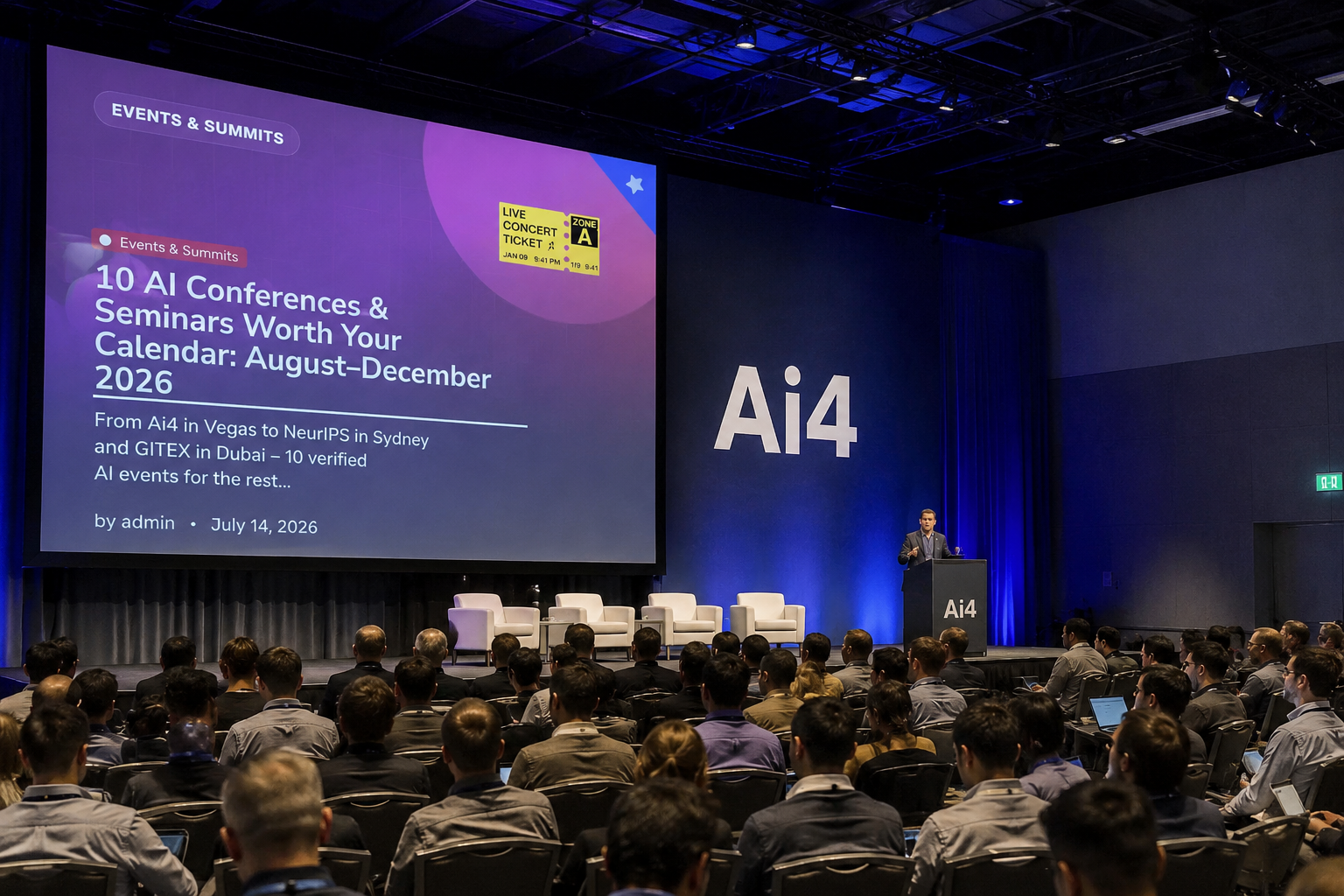
10 AI Conferences & Seminars Worth Your Calendar: August–December 2026

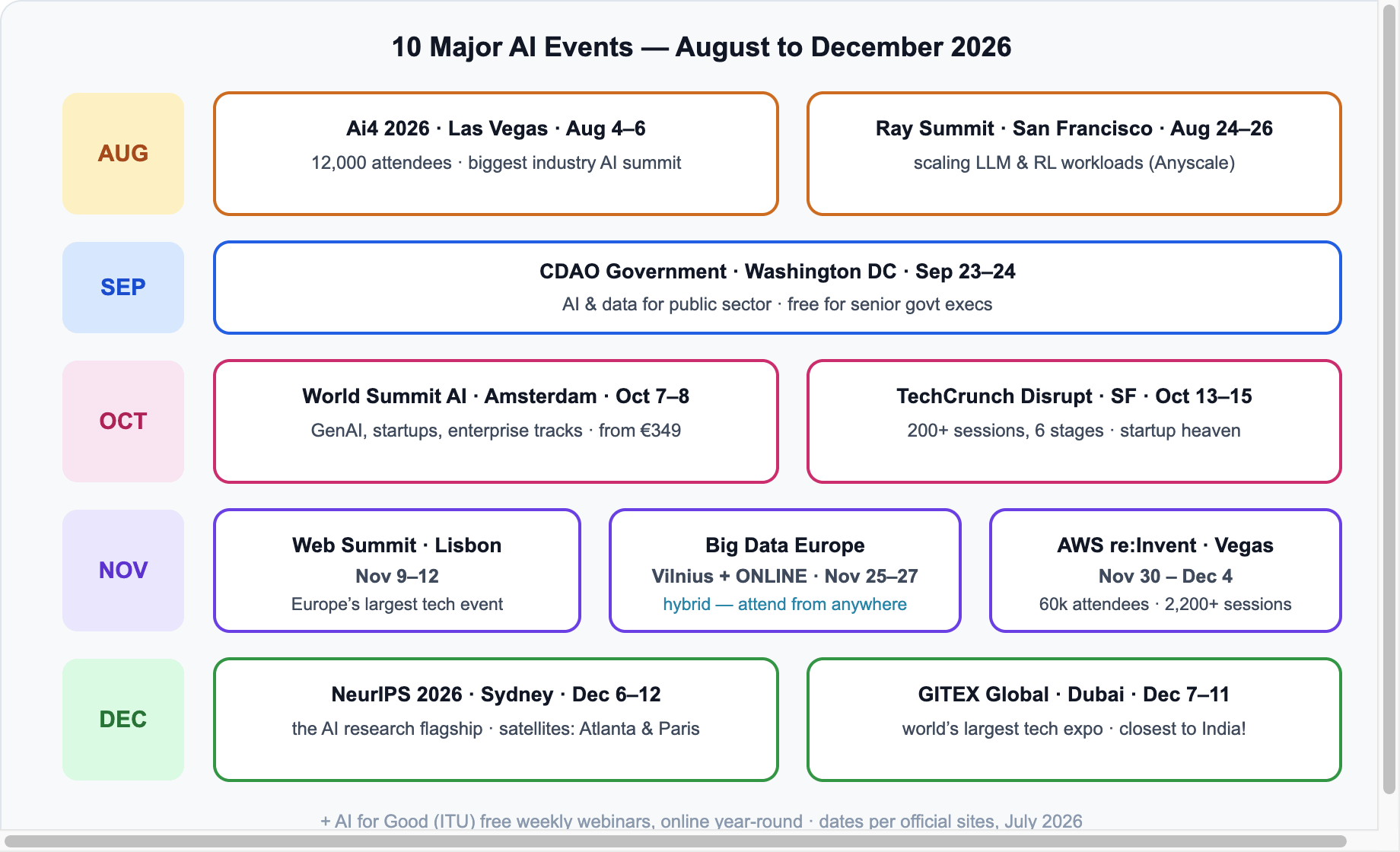
The second half of 2026 is stacked: the world’s biggest AI industry summit, the top research conference moving to Sydney, and the largest tech expo on the planet running in Dubai the very same week. Here are 10 AI events and seminars worth planning for between August and December 2026 — dates verified from official sites, with who-should-go guidance and budget notes.

Timeline of 10 major AI events August to December 2026
The month-by-month map — details and links for each event below

1. Ai4 2026 — Las Vegas, USA · August 4–6 · In-Person

The biggest industry AI gathering in North America: 1,000+ speakers, ~12,000 attendees from 90+ countries, covering applied AI in finance, healthcare, retail and government. Tickets $1,395–$3,195.

Go if: you sell AI, buy AI, or want enterprise connections. Official site

2. Ray Summit 2026 — San Francisco, USA · August 24–26 · In-Person

Anyscale’s conference on scaling AI infrastructure: training foundation models, multimodal pipelines, and large-scale LLM/RL workloads. Includes a hands-on training day on Aug 24.

Go if: you’re an ML engineer running serious distributed workloads. Official site

3. CDAO Government — Washington DC, USA · September 23–24 · In-Person

AI and data strategy for the public sector. $499 — and free for VP/C-level government executives.

Go if: you work in or sell to government. Organizer (Corinium)

4. World Summit AI — Amsterdam, Netherlands · October 7–8 · In-Person

Europe’s headline AI summit: generative AI, scaling startups, and enterprise tracks, with a large expo floor. Tickets from €349 — among the most affordable of the big ones.

Go if: you want the European AI ecosystem in two days. Official site

5. TechCrunch Disrupt 2026 — San Francisco, USA · October 13–15 · In-Person

The startup event: 200+ sessions across 6 stages, 250+ speakers at Moscone West, plus the famous Startup Battlefield. AI is the dominant theme this year.

Go if: you’re a founder, investor, or job-hunting in startups. Official site

6. Web Summit 2026 — Lisbon, Portugal · November 9–12 · In-Person

Europe’s largest tech event (70,000+ attendees), with AI now the center of gravity across every stage. Legendary for networking — the night summits matter as much as the talks.

Go if: breadth + networking is the goal. Official site

7. Big Data & AI Europe — Vilnius, Lithuania + ONLINE · November 25–27 · Hybrid

The 10th edition, covering LLMs, deep learning and predictive analytics — and it’s hybrid, so you can attend the full conference from anywhere. In-person €700–€1,350; online access cheaper.

Go if: you want a serious European data/AI conference without the travel. Official site

8. AWS re:Invent 2026 — Las Vegas, USA · November 30 – December 4 · In-Person

The cloud giant’s flagship: 60,000+ attendees, 2,200+ sessions, and traditionally the week AWS drops its biggest AI announcements (Bedrock, Trainium, agents). Keynotes stream free online.

Go if: your stack runs on AWS — or watch the keynotes remotely. Official site

9. NeurIPS 2026 — Sydney, Australia · December 6–12 · In-Person (+ satellites)

The most prestigious AI research conference moves to Sydney this year, with satellite events in Atlanta (Dec 9–13) and Paris (Dec 9–13) so researchers on other continents can participate. This is where next year’s breakthroughs get published first.

Go if: research is your world — or follow the paper releases online (free). Official site

10. GITEX Global 2026 — Dubai, UAE · December 7–11 · In-Person

The world’s largest tech expo takes over Dubai, with AI as the headline theme across the Dubai Exhibition Centre. For readers in India, this is the closest world-class mega event — a 3-4 hour flight instead of 15+.

Go if: you’re in India/Middle East/Asia and want maximum expo per air-mile. Official site

Bonus: Free & Online, All Year

💻 No Budget? No Problem

Planning Cheat Sheet

EventDatesWhereFormatBudget
Ai4Aug 4–6Las VegasIn-person$$$
Ray SummitAug 24–26San FranciscoIn-person$$
CDAO GovernmentSep 23–24Washington DCIn-person$ (free for govt execs)
World Summit AIOct 7–8AmsterdamIn-person$
TechCrunch DisruptOct 13–15San FranciscoIn-person$$
Web SummitNov 9–12LisbonIn-person$$
Big Data & AI EuropeNov 25–27Vilnius + onlineHybrid$–$$
AWS re:InventNov 30–Dec 4Las VegasIn-person (free streams)$$$
NeurIPSDec 6–12Sydney (+Atlanta, Paris)In-person$$
GITEX GlobalDec 7–11DubaiIn-person$

References: dates confirmed from official event sites linked above, plus aggregators DataCamp, zPlatform and Journeybee, as of July 14, 2026. Always re-confirm dates and prices on the official page before booking travel.

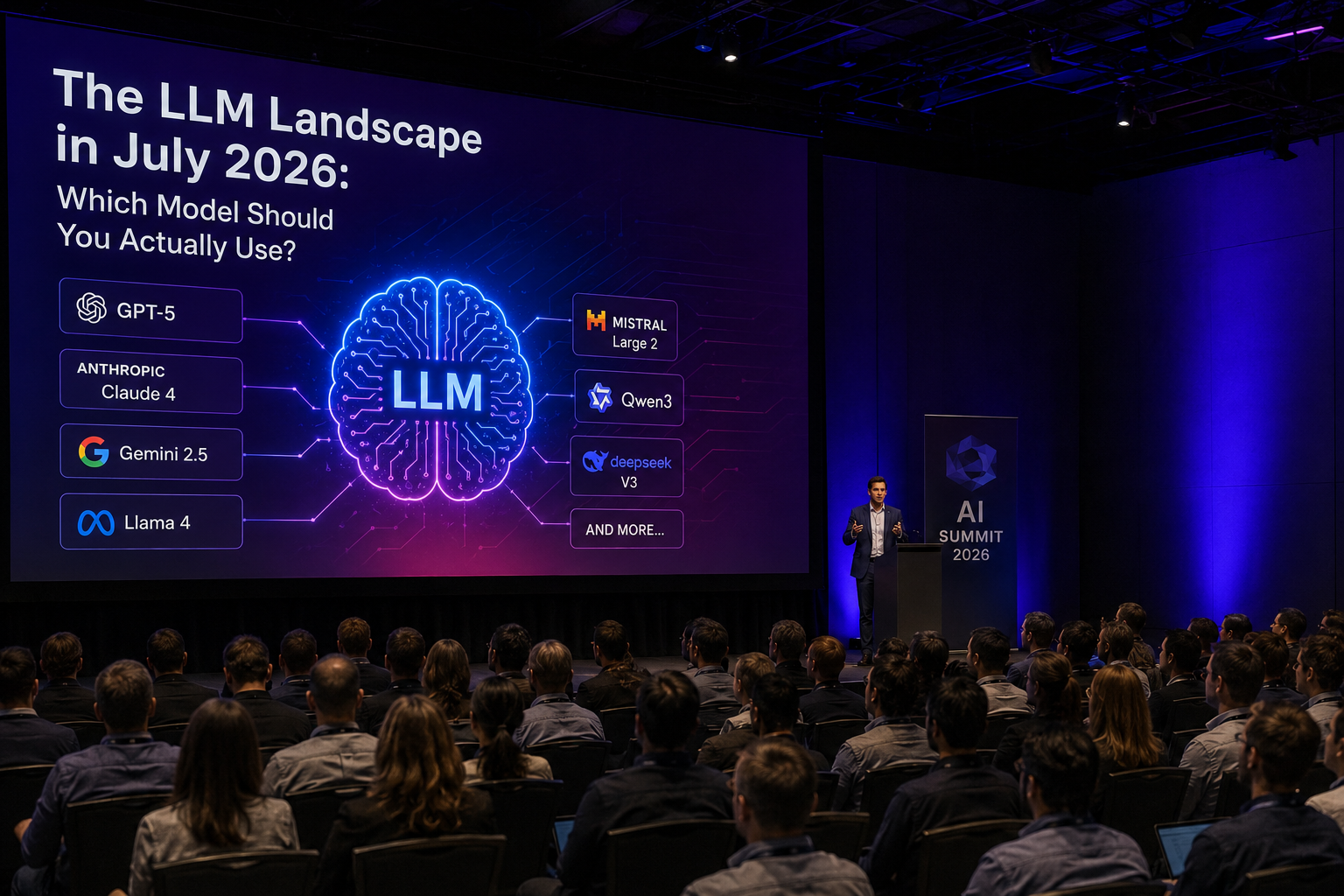
The LLM Landscape in July 2026: Which Model Should You Actually Use?

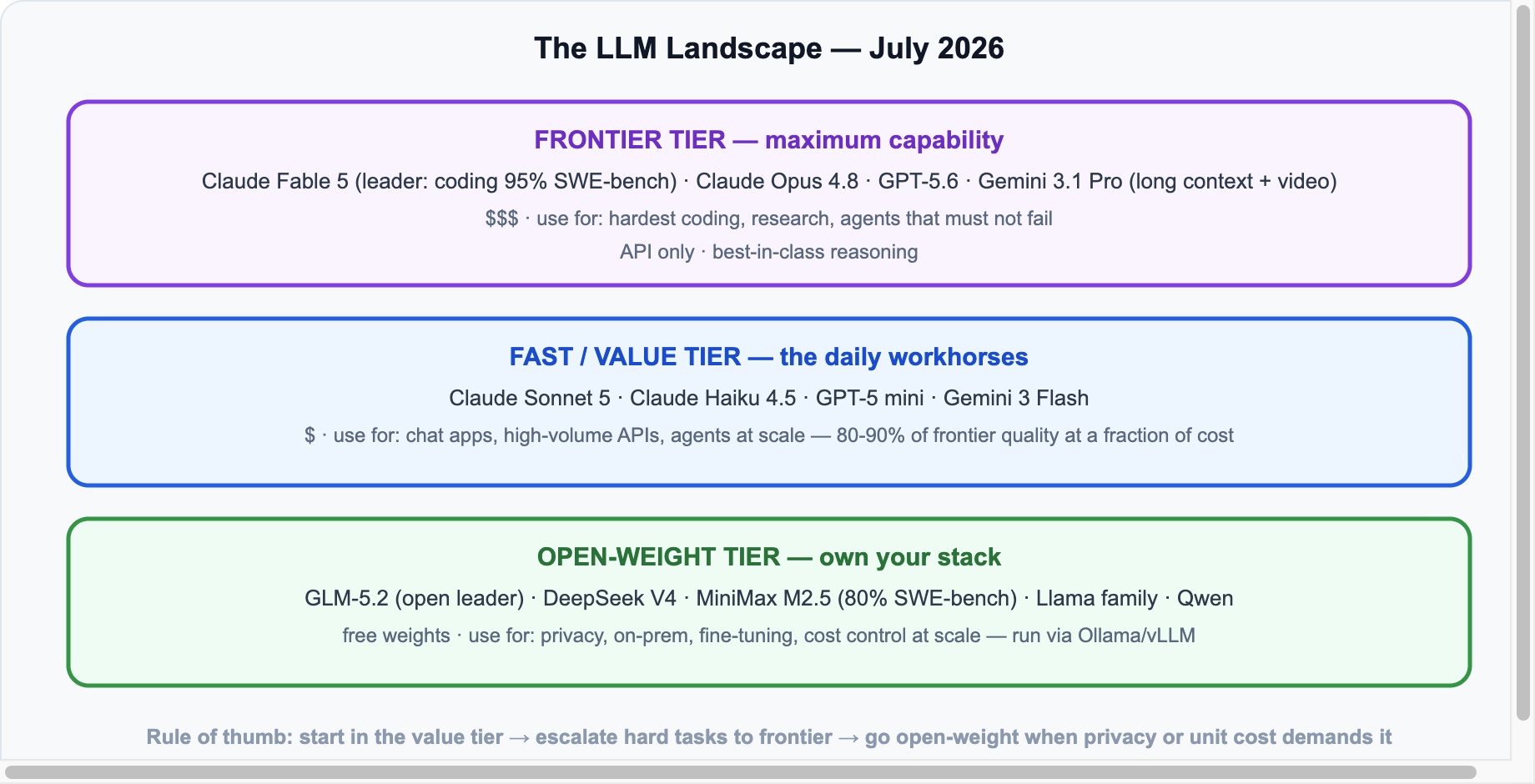
Six months into 2026 and the LLM market has never moved faster: Anthropic’s Claude Fable 5 launched (and survived a brief export-control shutdown), OpenAI shipped GPT-5.6, Google’s Gemini 3.1 Pro took the science crown, and open-weight models closed the coding gap. Here’s a plain-English map of which model to actually use, and for what.

The Three Tiers

LLM landscape tiers July 2026
Frontier for the hardest work, value tier for volume, open-weight for control

Frontier Tier: The Leaders

  • Claude Fable 5 (Anthropic) — current leader on public intelligence rankings, with a clear margin on frontier coding (95.0% on SWE-bench Verified) and Humanity’s Last Exam (53.3%). It made headlines twice in June: first as the top model, then when a US export-control order briefly forced it offline over vulnerability-finding capabilities — it returned globally on July 1 with new safeguards, priced at $10/$50 per million tokens.
  • Claude Opus 4.8 — Anthropic’s workhorse flagship, right behind Fable 5 and cheaper; the default for serious coding without Fable-tier budgets.
  • GPT-5.6 (OpenAI) — the everything-model: multimodal + reasoning unified (the GPT-4o, o3 and Codex lines merged). GPT-5.4 still leads specifically on computer use.
  • Gemini 3.1 Pro (Google) — the scientist: leads GPQA Diamond (94.3%) and abstract reasoning (ARC-AGI-2, 77.1%), and remains unmatched on huge documents and video understanding.

Value Tier: The Daily Workhorses

Most production traffic shouldn’t hit frontier models at all. Claude Sonnet 5, Claude Haiku 4.5, GPT-5 mini and Gemini 3 Flash deliver 80–90% of frontier quality at a fraction of the price and latency. The standard 2026 pattern is router architecture: default to a value model, escalate to frontier only when the task demands it.

Open-Weight Tier: Own Your Stack

  • GLM-5.2 — the open-weights leader (91.2% GPQA), remarkably close to closed frontier on reasoning.
  • MiniMax M2.5 — 80.2% on SWE-bench: open models can now genuinely code.
  • DeepSeek V4 — the cost king for API-style serving at scale.
  • Llama family (Meta) — outpaced on raw intelligence but still everywhere, with the deepest tooling ecosystem, and dead simple to run locally.

💡 The 2026 Shift

The gap between closed frontier and open weights is now months, not years. If privacy, unit cost, or fine-tuning control matters, open-weight + Ollama/vLLM is a serious production choice — not a hobby.

How to Pick: Cheat Sheet

Your needUse
Hardest coding & agentsClaude Fable 5 / Opus 4.8
General assistant, multimodalGPT-5.6
Science, math, huge docs, videoGemini 3.1 Pro
High-volume app trafficSonnet 5 / GPT-5 mini / Gemini 3 Flash
Privacy / on-prem / fine-tuningGLM-5.2, DeepSeek V4, MiniMax M2.5
Local on a laptopLlama / Qwen via Ollama

Bottom line: there is no single “best” LLM in 2026 — there’s a best model per job, and the winning teams route between them.

Sources & further reading: LLM-Stats leaderboard · BenchLM July 2026 · Zapier’s Best LLMs 2026 · Codingscape roundup. Benchmarks as reported July 2026; scores shift monthly — check leaderboards before committing.

MCP Explained: The USB-C Port of AI — How Model Context Protocol Works (With Code)

If you’ve wondered why every AI tool in 2026 advertises “MCP support”, here’s the answer. The Model Context Protocol is an open standard (created by Anthropic in late 2024, since adopted across the industry — OpenAI, Google DeepMind and thousands of tools) that lets any AI app talk to any data source or tool through one connector. It’s the USB-C port of AI — and this guide explains it with working code.

The Problem MCP Solves

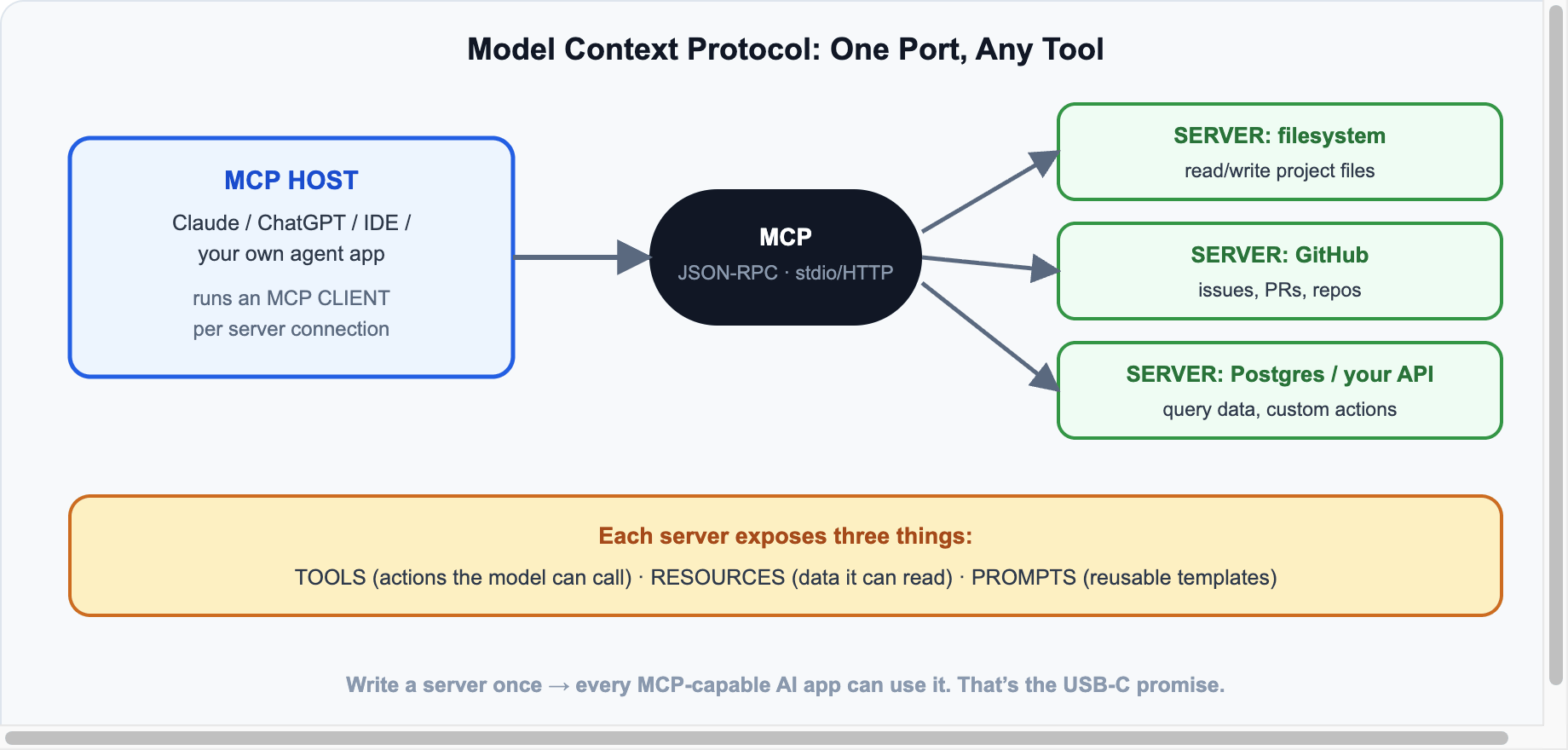
Before MCP, connecting an AI assistant to your tools was an N×M nightmare: every app (Claude, ChatGPT, your IDE) needed a custom integration for every service (GitHub, Postgres, Slack…). MCP collapses that to N+M: apps implement the protocol once, services expose a server once, and everything connects to everything.

Architecture

MCP architecture: host, client, servers
Host runs a client per server; JSON-RPC over stdio (local) or HTTP (remote)

Three roles: the host is the AI app the user sees; it runs an MCP client per connection; each MCP server wraps a capability (filesystem, GitHub, your internal API). Transport is JSON-RPC over stdio for local servers or streamable HTTP for remote ones.

What a Server Exposes

  • Tools — actions the model can call (create_issue, query_db).
  • Resources — data the app can read (files, records, docs).
  • Prompts — reusable templates the user can invoke.

Build an MCP Server in Python (15 Lines)

pip install "mcp[cli]"
# server.py
from mcp.server.fastmcp import FastMCP

mcp = FastMCP("blog-stats")

@mcp.tool()
def get_post_stats(slug: str) -> dict:
    """Get view count and word count for a blog post by slug."""
    # replace with a real DB/API call
    return {"slug": slug, "views": 1240, "words": 980}

@mcp.resource("posts://recent")
def recent_posts() -> str:
    """List the five most recent post titles."""
    return "1. LLM Landscape 2026\n2. CrewAI Tutorial\n3. Ollama Guide"

if __name__ == "__main__":
    mcp.run()   # stdio transport by default

Test it instantly with the built-in inspector: mcp dev server.py. To use it in Claude Desktop, add it to the config and the tools appear in every conversation:

{
  "mcpServers": {
    "blog-stats": { "command": "python", "args": ["/path/to/server.py"] }
  }
}

Using Servers in Real Apps

  • Claude Desktop / Claude Code, ChatGPT, Cursor, VS Code — all speak MCP natively; point them at any server.
  • Your own agent: LangChain, the AI SDK, and CrewAI can all consume MCP tools — write the integration once, reuse it across frameworks (see our LangChain tutorial).
  • Ready-made servers: thousands exist — filesystem, GitHub, Postgres, Slack, browsers, search — browse the official registry.

Security Notes

⚠️ Before You Wire Up Everything

  • Servers run with your permissions — a malicious server is a malicious program. Install only from sources you trust.
  • Prompt injection is real: tool results can contain hostile instructions; hosts should treat tool output as untrusted data.
  • Scope credentials tightly — give a DB server a read-only user, not root.

Sources & further reading: modelcontextprotocol.io · Python SDK · Anthropic MCP docs · server registry.

OpenAI Bets on Families: ChatGPT’s Next Big Audience Shift

OpenAI is quietly preparing its next big audience play — and it’s not developers or enterprises. It’s families. The company is hiring a dedicated product manager in San Francisco to build experiences for families, caregivers, and older adults across its products, signalling that ChatGPT is evolving from a personal productivity tool into household technology.

What’s Happening

According to a TechCrunch report, OpenAI’s job posting calls for experience building products for parents and families and other “trust-sensitive” consumer experiences. It’s the clearest signal yet that OpenAI wants ChatGPT embedded in household life — the same path Google, Apple, and Meta took as their platforms matured.

As analyst Ben Bajarin of Creative Strategies put it, AI raises the stakes compared to those earlier platform shifts, because the assistant isn’t just mediating content or devices — it’s talking directly to your kids.

The Numbers Behind the Shift

ChatGPT audience demographics shift 2025 to 2026
The demographic shift driving OpenAI’s family push

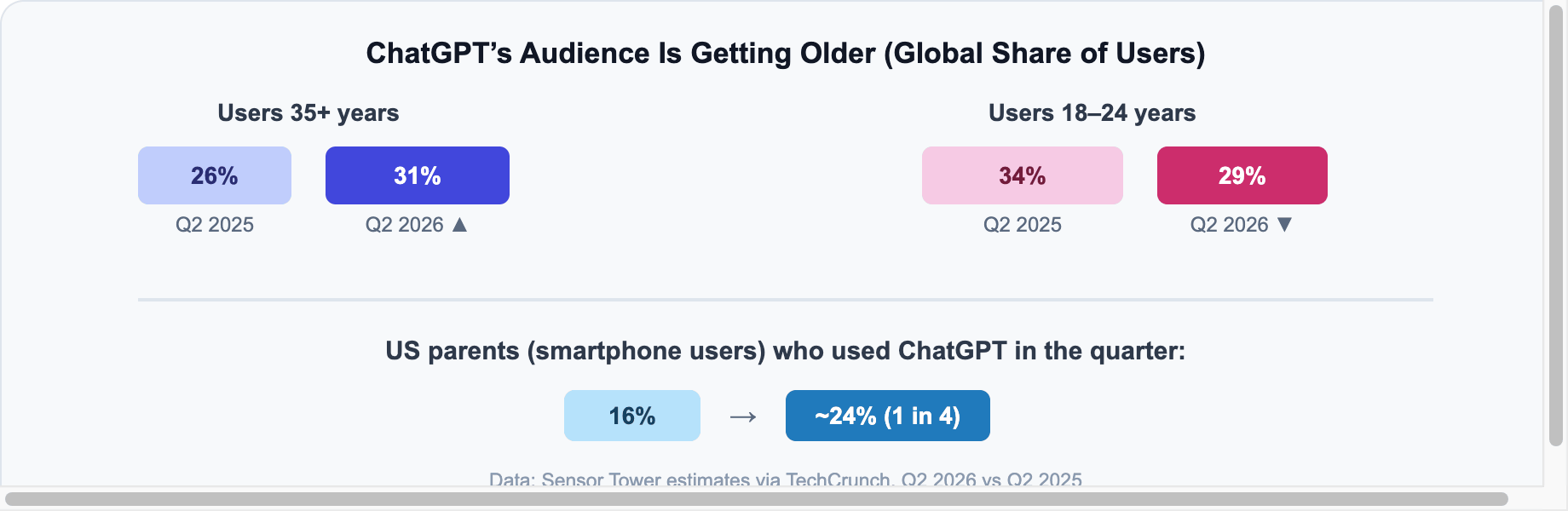
Per Sensor Tower estimates, ChatGPT’s global user base aged 35+ grew from 26% to 31% in a year, while the 18–24 share fell from 34% to 29%. In the US, nearly one in four parents with smartphones used ChatGPT last quarter, up from 16% a year earlier. The “young early adopter” era is over — ChatGPT is now mainstream family software.

Why Families, Why Now

  • Growth math: individual power users are saturated; households are the next multiplier. Family plans also lock in subscriptions the way Netflix and Spotify family tiers did.
  • Kids are already there: new research from the Family Online Safety Institute (4,000+ families surveyed in the US and Australia) found 38% of children used generative AI in the past week — while only 27% of parents thought they had. Parents are underestimating usage by a wide margin.
  • Hardware is coming: with OpenAI’s rumored consumer device in development, a family-trust brand becomes strategically essential before it lands in living rooms.

The Safety Question

This push comes under real legal pressure. OpenAI faces multiple lawsuits from parents alleging ChatGPT contributed to harm suffered by their children. FOSI chief executive Stephen Balkam calls the new direction “safety by redesign” — retrofitting a product that was never originally built with kids in mind.

⚠️ What Experts Say Family AI Needs

  • Stronger content controls and age-appropriate experiences
  • Real parental oversight tools (not buried settings)
  • Clear, repeated reminders that the user is talking to an AI, not a human

What It Means for the AI Market

Expect the whole industry to follow. Google is already positioning Gemini inside Android family accounts, and Meta ships AI across WhatsApp and Instagram where teens already live. The battleground is shifting from “best model” to “most trusted household assistant” — and trust, not benchmarks, will decide who wins the family market.

For builders, this also hints at a coming wave of family-focused AI product categories: homework helpers with guardrails, caregiver assistants for aging parents, and shared family memory/planning tools.

Sources & further reading: TechCrunch · FOSI research · OpenAI careers.