




If you’ve wondered why every AI tool in 2026 advertises “MCP support”, here’s the answer. The Model Context Protocol is an open standard (created by Anthropic in late 2024, since adopted across the industry — OpenAI, Google DeepMind and thousands of tools) that lets any AI app talk to any data source or tool through one connector. It’s the USB-C port of AI — and this guide explains it with working code.
📋 In This Article
The Problem MCP Solves
Before MCP, connecting an AI assistant to your tools was an N×M nightmare: every app (Claude, ChatGPT, your IDE) needed a custom integration for every service (GitHub, Postgres, Slack…). MCP collapses that to N+M: apps implement the protocol once, services expose a server once, and everything connects to everything.
Architecture
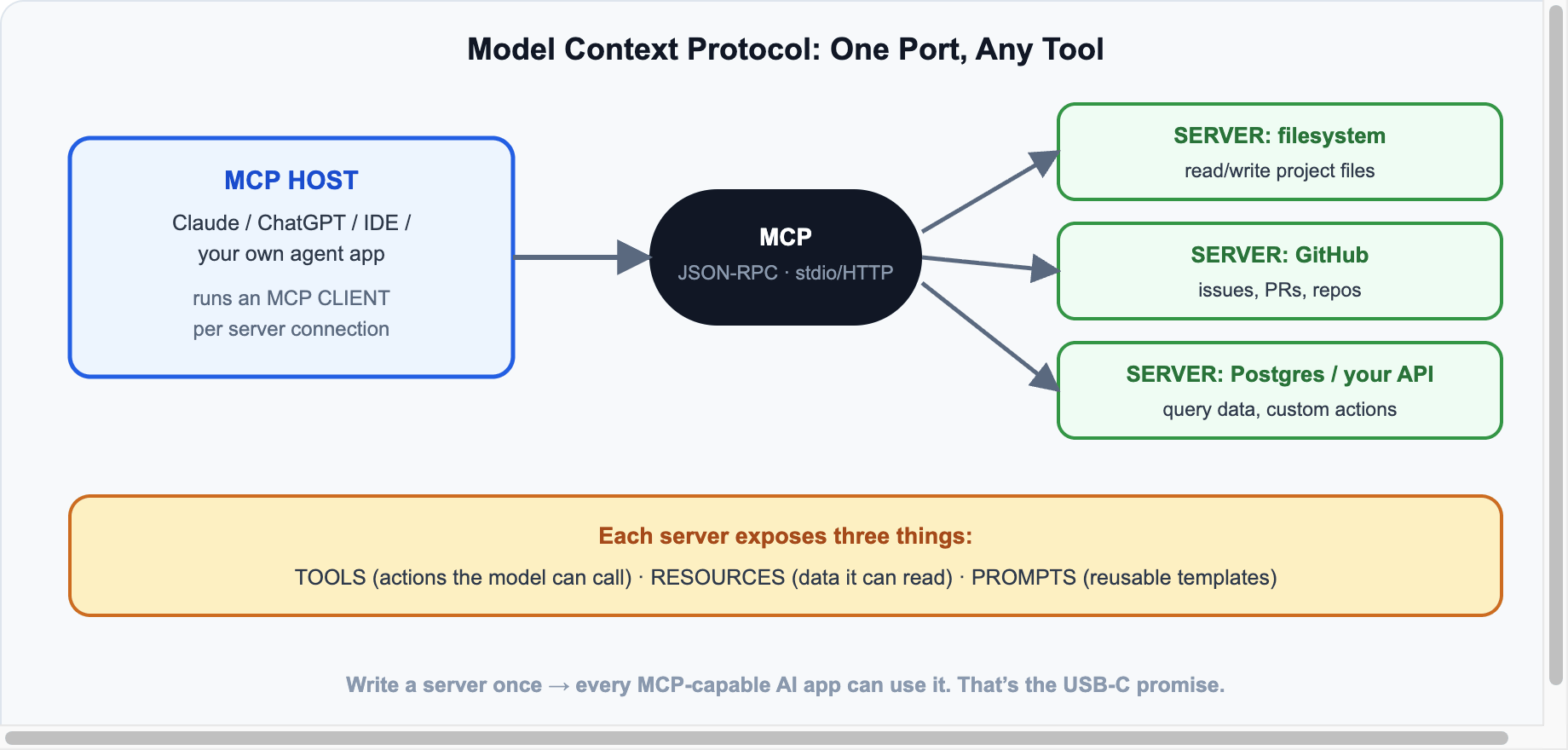
Three roles: the host is the AI app the user sees; it runs an MCP client per connection; each MCP server wraps a capability (filesystem, GitHub, your internal API). Transport is JSON-RPC over stdio for local servers or streamable HTTP for remote ones.
What a Server Exposes
- Tools — actions the model can call (
create_issue,query_db). - Resources — data the app can read (files, records, docs).
- Prompts — reusable templates the user can invoke.
Build an MCP Server in Python (15 Lines)
pip install "mcp[cli]"# server.py
from mcp.server.fastmcp import FastMCP
mcp = FastMCP("blog-stats")
@mcp.tool()
def get_post_stats(slug: str) -> dict:
"""Get view count and word count for a blog post by slug."""
# replace with a real DB/API call
return {"slug": slug, "views": 1240, "words": 980}
@mcp.resource("posts://recent")
def recent_posts() -> str:
"""List the five most recent post titles."""
return "1. LLM Landscape 2026\n2. CrewAI Tutorial\n3. Ollama Guide"
if __name__ == "__main__":
mcp.run() # stdio transport by defaultTest it instantly with the built-in inspector: mcp dev server.py. To use it in Claude Desktop, add it to the config and the tools appear in every conversation:
{
  "mcpServers": {
    "blog-stats": { "command": "python", "args": ["/path/to/server.py"] }
  }
}
Using Servers in Real Apps
- Claude Desktop / Claude Code, ChatGPT, Cursor, VS Code — all speak MCP natively; point them at any server.
- Your own agent: LangChain, the AI SDK, and CrewAI can all consume MCP tools — write the integration once, reuse it across frameworks (see our LangChain tutorial).
- Ready-made servers: thousands exist — filesystem, GitHub, Postgres, Slack, browsers, search — browse the official registry.
Security Notes
⚠️ Before You Wire Up Everything
- Servers run with your permissions — a malicious server is a malicious program. Install only from sources you trust.
- Prompt injection is real: tool results can contain hostile instructions; hosts should treat tool output as untrusted data.
- Scope credentials tightly — give a DB server a read-only user, not root.
Sources & further reading: modelcontextprotocol.io · Python SDK · Anthropic MCP docs · server registry.






Leave a reply
Your email address will not be published. Required fields are marked *