



LangChain hit 1.0 in October 2025 and everything about how you build with it changed — the old chains and AgentExecutor are legacy now, and one clean abstraction, create_agent, sits at the center. This is a complete A-to-Z tutorial for LangChain 1.x (current line: 1.3) with working code you can run today.
📋 In This Tutorial
A. What LangChain Is in 2026
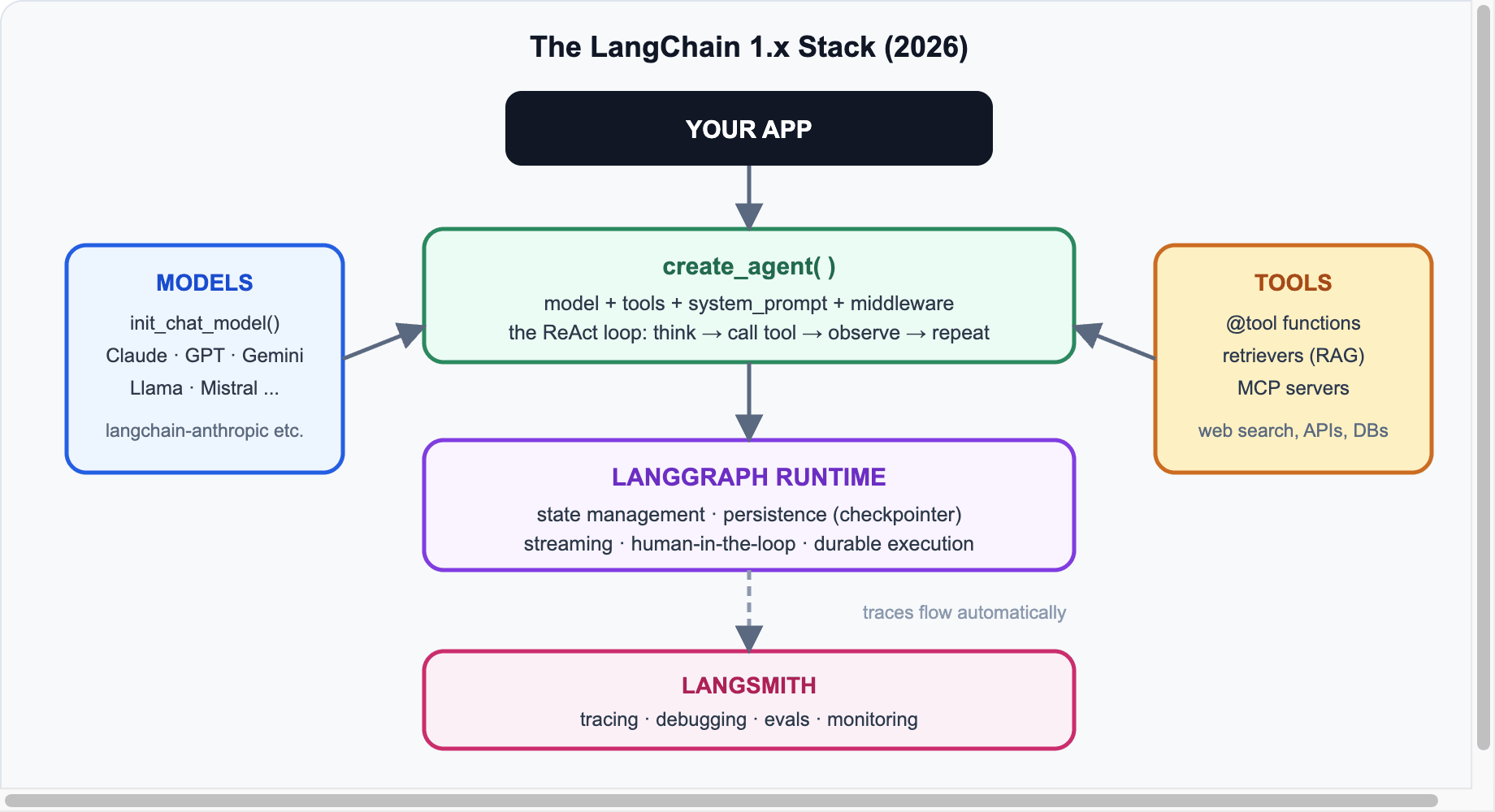
LangChain today is a small, focused agent framework: you give it a model, tools, and a prompt; it runs the agent loop (think → call tool → observe → repeat) on top of the LangGraph runtime, which brings persistence, streaming, and human-in-the-loop for free. Legacy pieces (LLMChain, AgentExecutor, ConversationBufferMemory) were moved to a separate langchain-classic package.
B. Install & Setup
pip install -U langchain langchain-anthropic
# optional extras used later in this tutorial:
pip install -U langchain-openai langgraph
Set your API key (Claude in this tutorial — swap freely):
export ANTHROPIC_API_KEY="sk-ant-..."C. Chat Models
init_chat_model gives you any provider behind one interface:
from langchain.chat_models import init_chat_model

model = init_chat_model("anthropic:claude-sonnet-5", temperature=0)

reply = model.invoke("Explain RAG in one sentence.")
print(reply.content)
Change "anthropic:claude-sonnet-5" to "openai:gpt-5.2" or "google_genai:gemini-3-pro" and nothing else in this tutorial changes.
D. Structured Output
Stop parsing strings — bind a schema and get validated objects:
from pydantic import BaseModel, Field

class Movie(BaseModel):
    title: str
    year: int = Field(description="Release year")
    rating: float = Field(description="IMDb-style rating 0-10")

structured = model.with_structured_output(Movie)
m = structured.invoke("Give me one classic sci-fi movie.")
print(m.title, m.year, m.rating)   # a real Movie object
E. Tools
Any Python function becomes a tool with the @tool decorator — the docstring matters, it’s what the model reads:
from langchain.tools import tool

@tool
def get_weather(city: str) -> str:
    """Get the current weather for a city."""
    # call a real API here
    return f"Sunny, 31°C in {city}"

@tool
def convert_currency(amount: float, from_cur: str, to_cur: str) -> str:
    """Convert an amount between currencies at today's rate."""
    rate = 83.2 if (from_cur, to_cur) == ("USD", "INR") else 1.0
    return f"{amount} {from_cur} = {amount * rate:.2f} {to_cur}"
F. Your First Agent: create_agent
This is the heart of LangChain 1.x — one call replaces everything AgentExecutor used to do:
from langchain.agents import create_agent

agent = create_agent(
    model="anthropic:claude-sonnet-5",
    tools=[get_weather, convert_currency],
    system_prompt="You are a helpful travel assistant. Use tools when needed.",
)

result = agent.invoke(
    {"messages": [{"role": "user",
       "content": "Weather in Delhi? And convert 100 USD to INR."}]}
)
print(result["messages"][-1].content)
Behind the scenes the agent runs the ReAct loop: the model decides which tool to call, LangChain executes it, feeds the result back, and repeats until the model produces a final answer.
G. Memory: Multi-Turn Conversations
Persistence comes from the LangGraph runtime — add a checkpointer and a thread_id:
from langgraph.checkpoint.memory import InMemorySaver

agent = create_agent(
    model="anthropic:claude-sonnet-5",
    tools=[get_weather],
    checkpointer=InMemorySaver(),
)

cfg = {"configurable": {"thread_id": "user-42"}}
agent.invoke({"messages": [{"role": "user", "content": "I'm Avneesh, planning a Goa trip."}]}, cfg)
r = agent.invoke({"messages": [{"role": "user", "content": "What's my name and where am I going?"}]}, cfg)
# remembers: "Avneesh", "Goa"
💡 Production Note
Swap InMemorySaver for a Postgres/SQLite checkpointer in production — same code, durable conversations that survive restarts.
H. RAG: Give Your Agent Knowledge
The modern pattern is RAG-as-a-tool — retrieval is just another tool the agent can decide to use:
from langchain_core.vectorstores import InMemoryVectorStore
from langchain_openai import OpenAIEmbeddings

docs = [
    "Our refund policy: full refund within 30 days of purchase.",
    "Support hours: 9am-6pm IST, Monday to Saturday.",
    "Premium plan costs $29/month and includes API access.",
]
store = InMemoryVectorStore.from_texts(docs, OpenAIEmbeddings())

@tool
def search_docs(query: str) -> str:
    """Search the company knowledge base."""
    hits = store.similarity_search(query, k=2)
    return "\n".join(d.page_content for d in hits)

support_agent = create_agent(
    model="anthropic:claude-sonnet-5",
    tools=[search_docs],
    system_prompt="Answer ONLY from the knowledge base. Say 'I don't know' otherwise.",
)
For real projects, swap InMemoryVectorStore for Qdrant, Pinecone, pgvector, or Chroma — the interface stays identical.
I. Streaming
Never make users wait for the full answer:
for chunk, metadata in agent.stream(
    {"messages": [{"role": "user", "content": "Weather in Mumbai?"}]},
    stream_mode="messages",
):
    if chunk.content:
        print(chunk.content, end="", flush=True)
stream_mode="updates" instead gives you step-by-step agent progress (which tool it’s calling and why) — great for showing “thinking” UI.
J. Production: Middleware & LangSmith
1.x added a middleware system — cross-cutting concerns without touching agent logic. For example, automatic retries with exponential backoff on failed model calls (built-in since 1.1), plus summarization middleware that compacts old messages when context grows. Add observability by setting two env vars — every agent run gets traced in LangSmith:
export LANGSMITH_TRACING=true
export LANGSMITH_API_KEY="lsv2_..."
K. Migrating from v0
| v0 (legacy) | v1 (current) |
|---|---|
AgentExecutor + initialize_agent | create_agent |
LLMChain | model + prompt directly (LCEL) |
ConversationBufferMemory | checkpointer + thread_id |
| Old code still needed? | pip install langchain-classic |
L. Common Mistakes
⚠️ Avoid These
- Vague tool docstrings — the model chooses tools by reading them. Be specific about what each tool does and when to use it.
- Too many tools — beyond ~10-15, selection quality drops. Group related APIs into one tool with a parameter.
- No max iterations — always bound the agent loop in production to cap costs.
- Skipping evals — a 10-prompt golden set in CI catches regressions when you swap models.
✅ Key Takeaways
- LangChain 1.x =
create_agent+ LangGraph runtime. Learn those two things and you know the framework. - Everything is provider-agnostic: swap Claude/GPT/Gemini with one string.
- Memory = checkpointer, knowledge = RAG-as-a-tool, reliability = middleware.
Sources & further reading: Official LangChain docs · 1.0 announcement · GitHub · Changelog (1.3.x). Code tested against LangChain 1.3; APIs stable until 2.0 per the project’s compatibility promise.





Leave a reply
Your email address will not be published. Required fields are marked *