



Want ChatGPT-class AI that runs on your machine — free, private, offline? That’s Ollama. One install, one command, and you’re chatting with an open-weight LLM locally. This is the complete 2026 guide: setup, choosing models, the API, connecting frameworks, and squeezing performance out of your hardware.
📋 In This Guide
How Ollama Works
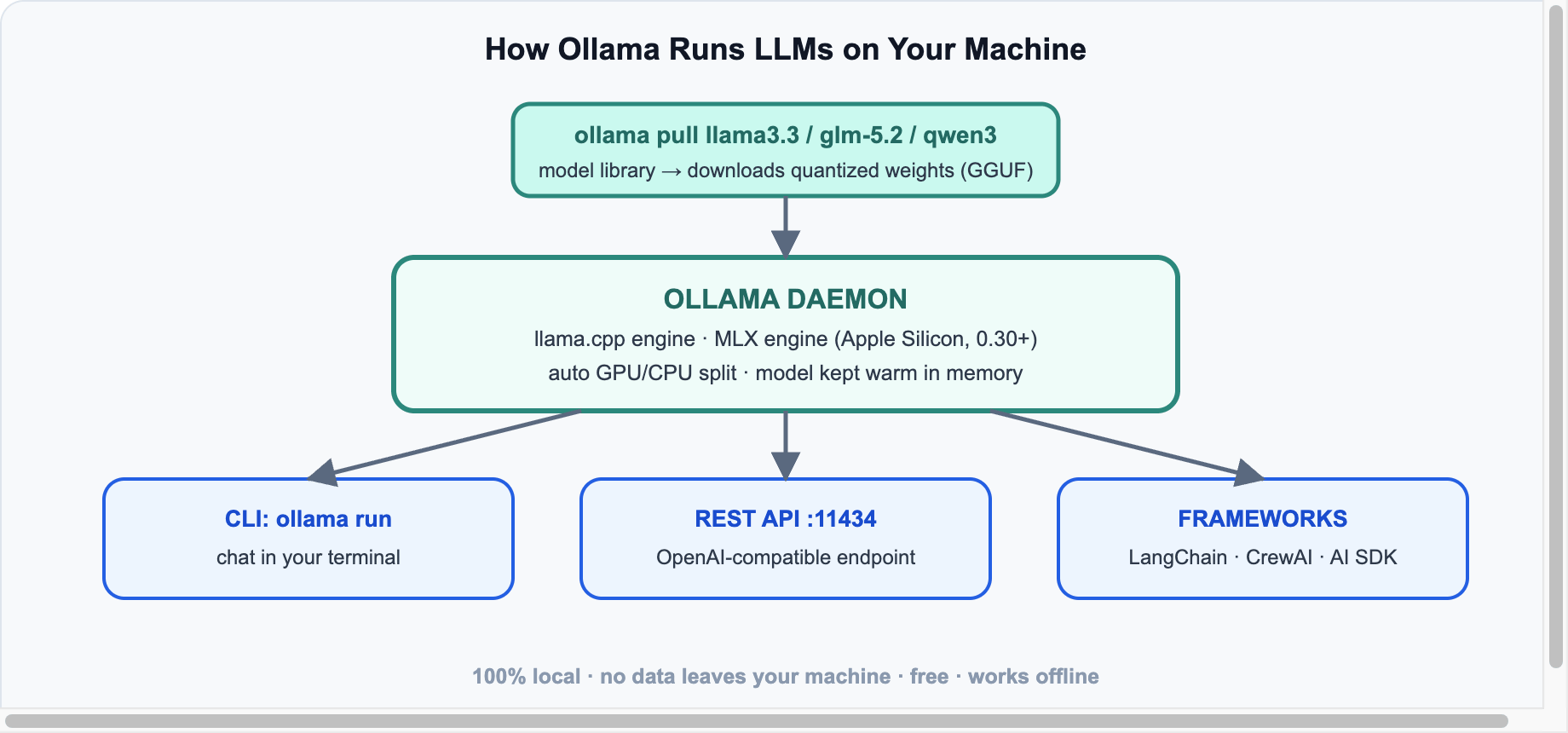
Ollama is a local daemon that downloads quantized open-weight models and serves them through a REST API on port 11434. Under the hood it runs llama.cpp — and since v0.30, a dedicated MLX engine on Apple Silicon that makes Macs dramatically faster. Nothing you type ever leaves your machine.
Install & First Chat
# macOS / Linux
curl -fsSL https://ollama.com/install.sh | sh   # or download the app from ollama.com

ollama run llama3.3        # downloads the model on first run, then chats
That’s genuinely it. /bye exits the chat; ollama list shows what you’ve downloaded; ollama ps shows what’s loaded in memory. Recent versions also added ollama launch to spin up coding agents (Codex, OpenCode) wired to local models in one command.
Which Model to Pull (July 2026)
| RAM you have | Pull this | Good for |
|---|---|---|
| 8 GB | llama3.2:3b, qwen3:4b | chat, summaries, quick Q&A |
| 16 GB | llama3.3 (8B), qwen3:8b | solid general use, light coding |
| 32 GB | qwen3:32b, glm-5.2:air | serious coding, agents |
| 64 GB+ | deepseek-v4:70b-class, MiniMax M2.5 quants | near-frontier quality, fully local |
Rule of thumb: a Q4-quantized model needs roughly RAM = parameters × 0.6 (an 8B model ≈ 5 GB). Browse the full library at ollama.com/library.
The API
Ollama exposes its own API and an OpenAI-compatible endpoint — so any tool that speaks OpenAI works locally by changing one URL:
curl http://localhost:11434/v1/chat/completions -d '{
  "model": "llama3.3",
  "messages": [{"role": "user", "content": "Explain quantization in one line."}]
}'
# Python, using the standard openai package
from openai import OpenAI
client = OpenAI(base_url="http://localhost:11434/v1", api_key="ollama")
r = client.chat.completions.create(model="llama3.3",
messages=[{"role":"user","content":"Hello local AI!"}])
print(r.choices[0].message.content)Connecting Frameworks
- LangChain:
init_chat_model("ollama:llama3.3")— everything from our LangChain A-to-Z tutorial works locally. - CrewAI:
LLM(model="ollama/llama3.3", base_url="http://localhost:11434"). - AI SDK (React): the community
ollama-ai-providerplugs into the samestreamTextpattern from our React 19 + AI guide.
Performance Tips
⚡ Speed Checklist
- Apple Silicon? Update to 0.30+ for the MLX engine — big token/sec gains on M-series.
- Keep models warm:
OLLAMA_KEEP_ALIVE=1havoids reload lag between requests. - Context costs RAM: long contexts eat memory fast; set
num_ctxto what you actually need. - Don’t over-quantize: Q4_K_M is the sweet spot; below Q3 quality falls off a cliff.
- GPU offload is automatic — but
ollama pstells you how much of the model actually fit on the GPU.
Sources & further reading: ollama.com · GitHub (150k+ stars) · Ollama blog (MLX engine, ollama launch). Current release line: 0.30/0.31.





Leave a reply
Your email address will not be published. Required fields are marked *