




React is still the most popular way to build web UIs — and in 2026 it has quietly become the best front-end for AI products too. With React 19.2 (the current stable line) and a mature AI tooling ecosystem, you can ship a streaming, tool-using AI app in an afternoon. This guide covers the full stack: what’s new in React 19, the architecture, real code, and the libraries worth your time.
📋 In This Article
React 19 Features That Matter for AI Apps
- Actions &
useActionState— async mutations with built-in pending/error states. Perfect for “send prompt, await response” flows without hand-rolled loading flags. useOptimistic— show the user’s message in the chat instantly while the request is in flight. AI apps feel dramatically faster with this one hook.use()+ Suspense — unwrap promises directly in components; pair with streaming server responses so the UI fills in as data arrives.- Server Components — keep your API keys, RAG retrieval, and heavy AI logic on the server, and send only rendered UI to the client.
The Architecture
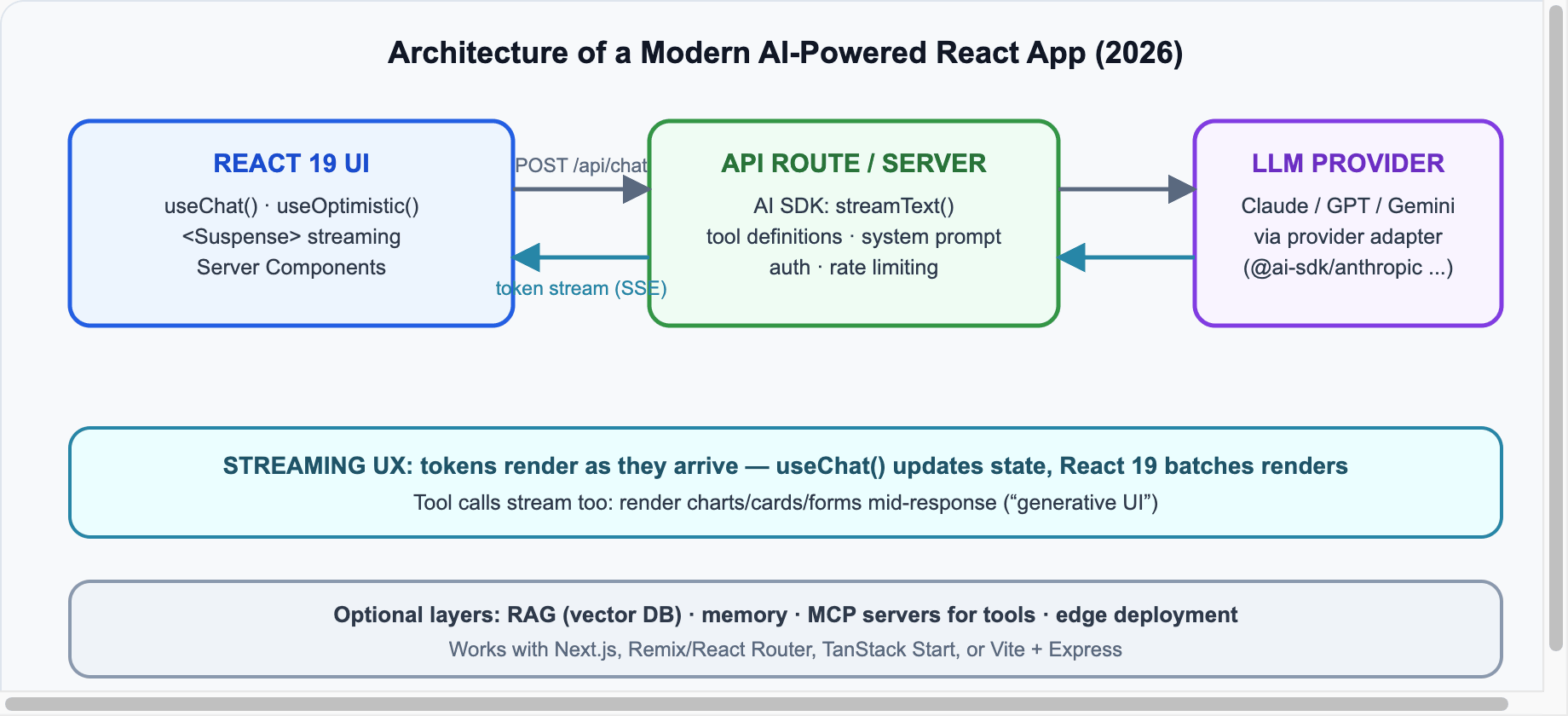
Every serious AI-React app in 2026 converges on this shape: the browser never talks to the LLM directly (keys stay server-side), the server streams tokens back over SSE, and the UI renders them incrementally.
Build It: Streaming Chat in ~40 Lines
The de-facto standard is the AI SDK (from Vercel, open-source, works with any React framework). Install:
npm install ai @ai-sdk/react @ai-sdk/anthropicServer route (Next.js App Router — app/api/chat/route.ts):
import { anthropic } from '@ai-sdk/anthropic';
import { streamText, convertToModelMessages } from 'ai';

export async function POST(req: Request) {
  const { messages } = await req.json();

  const result = streamText({
    model: anthropic('claude-sonnet-5'),
    system: 'You are a helpful assistant. Be concise.',
    messages: convertToModelMessages(messages),
  });

  return result.toUIMessageStreamResponse();
}
Client component:
'use client';
import { useChat } from '@ai-sdk/react';
import { useState } from 'react';

export default function Chat() {
  const { messages, sendMessage, status } = useChat();
  const [input, setInput] = useState('');

  return (
    <div>
      {messages.map(m => (
        <div key={m.id} className={m.role}>
          {m.parts.map((p, i) =>
            p.type === 'text' ? <span key={i}>{p.text}</span> : null
          )}
        </div>
      ))}
      <form onSubmit={e => { e.preventDefault(); sendMessage({ text: input }); setInput(''); }}>
        <input value={input} onChange={e => setInput(e.target.value)}
               disabled={status !== 'ready'} placeholder="Ask anything..." />
      </form>
    </div>
  );
}
That’s a complete streaming chat app. Swap anthropic('claude-sonnet-5') for openai(...) or google(...) and nothing else changes — that’s the point of the provider adapter layer.
Generative UI: Beyond Chat Bubbles
The 2026 pattern that separates good AI apps from chat clones is generative UI: the model calls tools, and each tool result renders as a real React component — a chart, a booking card, a form. With the AI SDK you define tools server-side with a schema, then render tool parts by type on the client (a weather tool call becomes a <WeatherCard />, not a text blob). Users interact with components, not walls of text.
💡 Rule of Thumb
If the model’s answer has structure — lists, data, actions — render it as a component. Reserve plain text for actual prose. This single decision is most of what makes an AI app feel “native”.
The 2026 Library Landscape
| Library | Best for | Notes |
|---|---|---|
| AI SDK | Core streaming + tools | The default choice; framework-agnostic |
| assistant-ui | Ready-made chat UI | Composable primitives, works with AI SDK |
| CopilotKit | In-app copilots | Sidebar assistants that can act on app state |
| LangChain.js / LangGraph.js | Complex agent workflows | Use when you need multi-step orchestration |
| MCP | Standardized tools | Connect your app’s tools to any MCP-capable model |
Production Tips
- Stream everything. Perceived latency is the #1 UX metric in AI apps; never make users stare at a spinner for 8 seconds.
- Use
useOptimisticfor the user’s own messages, and show a typing indicator keyed onstatus. - Rate-limit and auth the API route — your LLM bill is an attack surface.
- Cache aggressively: system prompts and RAG chunks benefit from provider-side prompt caching (Anthropic and OpenAI both support it).
- Evaluate before you ship: even a handful of golden-set prompts run in CI will catch regressions when you swap models.
Sources & further reading: React versions · AI SDK docs · Anthropic API docs · React blog.





Leave a reply
Your email address will not be published. Required fields are marked *